Pgh Code Camp 2010.2

Uncategorized

Its getting to be that time. Wait, what time? We always have Code Camp in the spring – the leaves are going to fall (or started falling, if your trees are lame like mine) – surely Eric is on some sort of hallucinogens. Nope. This year we’re doing Code Camp twice – Code Camp 2010.2 will be October 16, 2010, once again in Pitt’s compsci building. Details can be found here.

Our call for speakers has gone out a while back, but there’s still room for more, so if you want to present on something, there’s still time. You can go fill out the call for speakers form here: http://codecamppgh.wufoo.com/forms/code-camp-20102-call-for-speakers/.

Bowling for TDD

Uncategorized

I’m going to try and do a little TDD in front of an audience at the next PghDotNet user group meeting. I’ve done a kata on Roman Numerals before, but not the bowling one, which I’ll be doing there. So, maybe I’ll fall flat on my face, but hey – isn’t that what good television is all about. Except not on television.

Titles are Fun

Uncategorized

So, you decide to apply for a job, or maybe a headhunter calls you with an exciting opportunity, so you apply, or whatever. You end up across the desk or phone line from me to discuss working on the team.

Your resume says you are an “Architect”. Nice lofty title, that one (especially when its granted after 1-2 years of actual development work – I really love that one). Lets hope you have the knowledge, skills and experience to back it up.

But for fun, waste my time. When I ask you about the SOLID principles, just tell me you’ve never heard of them. I definitely want to recommend we hire an architect who hasn’t heard about those – no sense wasting brain storage on such a trivial thing – its only 5 letter, how important can it be?

Tell me you’re not really familiar with design patterns. When I list some off, tell me about how you use the factory pattern everywhere, then don’t really give me a definition of it. That’s OK – you’re an architect. You don’t need to know anything about the details of anything – you’re a big picture person.

When I ask you about IDisposable and leaks, tell me about how its important to close your SQL connections. Great. I’m glad you know that. But what about those insidious event leaks? That crazy singleton class that somebody didn’t write properly that holds references to all kinds of disposed objects. How can you call yourself an architect if you haven’t seen crazy edge cases like that?

When asked about ORMs, just tell me you’ve never heard of them. When I spell out what one is, and use NHibernate as an example, keep pleading ignorance.

When asked about the methodology used in your shop – are you using waterfall, agile, or something different/in between, tell me you don’t know what those words mean. An architect doesn’t need to bog themselves down with learning about development methodologies and project management practices.

And the clincher: when I ask you what the last technical book you read was, ponder it for a few minutes, then tell me “some O’Reilly book about C# 3.0”. Good guess – I’m sure such a book exists without even looking. And when I ask what you learned from it, tell me “nothing”. I don’t need you to know anything in depth about current topics. I don’t want you to try and stay current. That’s just wasting time you could be hacking out code.

I’m not saying you need to know everything about these topics. I don’t even expect you to know off the top of your head about all 5 letters of SOLID and the exact meanings. But I expect that you will have some idea what the ideas are. I expect that you have some exposure to them.

I expect an architect to be a software development renaissance person. If I ask a question about a topic that’s a little outside of the mainstream, I expect that you know SOMETHING about it. I don’t expect everyone to know everything, but I expect that you are trying to constantly learn new things and stay as current as possible. I expect an architect to pick the best tools and techniques for the job – not just what they know from their last project.

Am I expecting too much?

Obtaining a Memory Dump to Diagnose Memory Leaks

Uncategorized

It is fairly easy and unobtrusive to end users to obtain a memory dump from a running .Net application, in order to track down a memory leak or other anomaly. The actual viewing of the dump is far more complicated. In this post, I will describe how to obtain the dump and the basics of viewing it. At the end there is a reference section that lists other documentation to further help with viewing and finding leaks and other anomalies.

Installing WinDbg

In order to do anything with a memory dump, you need to have the Windows Debugger (WinDbg) installed. The latest version can be downloaded from Microsoft’s web site (http://www.microsoft.com/whdc/devtools/debugging/installx86.mspx). It is a Windows installer – just install as you would any other utility.

If you need to obtain a memory dump from a customer or test machine, and do not want to run the installation, you can actually just copy the root directory of the installation to the machine, via a thumb drive or other simple means.

Creating the Memory Dump

One thing to note before actually proceeding: while you have the debugger attached to the process, the process will not be running. This will be apparent to users, so you will want to make sure you coordinate with them before doing this. Also note that if you do not disconnect the debugger properly, you will terminate the process, which the users will notice.

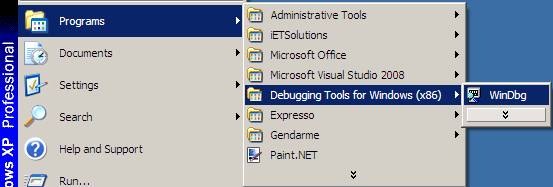
Start WinDbg from the Start Menu:

clip_image002

Or via Windows Explorer/Command Line:
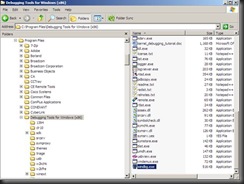
clip_image004

Once you have WinDbg started, you’ll need to attach to the process you wish to monitor. Select “Attach to a Process…” from the “File” menu:

clip_image006

Select the process you wish to attach to from the list and click “OK”:
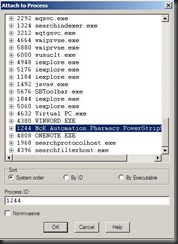
clip_image008

The debugger opens a window. In that window, the top area has the status and command output, the bottom has a line for entering commands. Note that by using the up arrow key, you can scroll back through past commands.

clip_image010

You can directly debug the application at this point, if you want, or you can create a memory dump and explore it later. Note that at this point, the application is in break mode, so the users will not be able to use it.

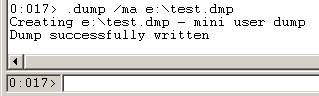
To obtain a full memory dump, which is the easiest thing to work with offline, you will use the .dump command with the /ma option. It will look like this:

clip_image012

And produce output that looks like this:

clip_image014

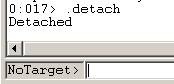
At this time, you have your dump file. You can detach the debugger and let the users go back to work. The command to detach is .detach, and it will result in the ending of your debugging session, with the application back in a running state as if nothing ever happened:
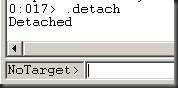
clip_image016

Basic Dump File Exploration

Start the Windows Debugger as before. One detail to keep in mind, you need to inspect the dump file on the same version of Windows as it was taken on (so, if it was taken on Windows XP, you need to view it on Windows XP, if it was on Windows 2003 Server, you need to view it on Windows 2003 server). Virtual machines can help with this. [NOTE: I’m sure this isn’t true – there has to be a way, but I didn’t find it quickly, and I had a virtual machine ready, so I didn’t look too hard.]

Open the “Crash Dump” via the “File” menu (All memory dumps are referred to as Crash Dumps in the debugger, even if no crash was involved):

clip_image018

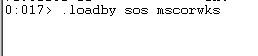
The first things you need to do is load the extensions for .Net debugging. This is a library called SOS.dll, and it lives in the same location as the .Net libraries. The easiest way to load it and ensure you are getting the right version is to use the .loadby command:

clip_image020

This command is a little disturbing, because it only reports failure, so you will not get an acknowledgement that it worked. If you see nothing in the output other than an echo of the command, it worked:

clip_image022

What this command means is load the SOS.dll from the same location you loaded the MSCORWKS.dll, which will be the .Net Framework directory. This is far easier than typing the full path to SOS.dll.

Now that you are all set up, the first thing you want to check is the relative amount of space used by different .Net objects. To do this, execute a !dumpheap –stat command:

clip_image024

clip_image026

All of the objects in the heap are listed by their class, in order from least memory usage to greatest, for the object class. It shows the number of instances (count) and the total size of those instances (TotalSize). Note that this is a shallow size – the memory consumed by the object itself, not any child objects it holds. This can be quite deceiving, but it is a good starting point.

Its best to look through the list from the bottom up, and see if you can notice anything that seems unusual (multiple instances of a particular form, for example, or large quantities of simple objects). When you discover something you want to further investigate, you can find the actual object memory addresses by using dumpheap with the name of the type (or you can use the value from the first column, MT). So, if you wanted to see more information about all 4 instances of System.Drawing.Color:

clip_image028

You could type:

!dumpheap –type System.Drawing.Color

or

!dumpheap –mt 0734f42c

Either of which will produce:

clip_image030

From here you can see the size of each object as well as the address where it resides. If you want to further investigate an object, this address is necessary. You can get more detail about the object using the !do command:
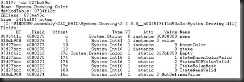
clip_image032

Here we see the fields that make up the object. Notice that in the Value column, if the field represents another object, the value will be the address of that object.

Another useful operation is to determine what object chain is keeping it in memory – in other words, the path from the object to the Garbage Collector root object holding it in memory. To do this, we can use the GCRoot command (note that this command can take a really long time):

clip_image034

This can show the parent (and further chain upward) of an object, which can be useful.

Resources

Here are some better sources for more information about how to dig deeper into memory dump exploration:

· SOS Debugging Extension reference: http://msdn.microsoft.com/en-us/library/bb190764.aspx

· Getting Started with WinDbg: http://blogs.msdn.com/johan/archive/2007/11/13/getting-started-with-windbg-part-i.aspx

· .Net Debugging Demos (actually, lots of stuff on this blog): http://blogs.msdn.com/tess/pages/net-debugging-demos-information-and-setup-instructions.aspx
A Conversation About Testing

Uncategorized

Transcript from a recent chat I had, details changed to protect the innocent (and typos changed to make me look smarter):

Testing Lead: How familiar are you with testing methodologies with Scrum?

Me: In theory, fairly well, in practice, who knows? 🙂

Testing Lead: I guess I’m looking for either one at this point. My problem is this: I have certain knowledge of how the processing is being done for [a particular feature/subsystem]. Is it wrong to use a white box approach to testing new features implemented using the Scrum model? The advantage is I can eliminate half of the test cases.

Me: Scrum doesn’t change the core of your job, but agile/lean principles suggest that you should eliminate the tests if they have no value

Testing Lead: So I should eliminate this waste because I have the advantage of knowing the internal workings of the code.

Me: I think so, or is that some how "cheating"? Is that ultimately your question?

Testing Lead: I don’t think of it as cheating, but if we truly adopted the lean principles, I should be able to trim down the test cases knowing what I know.

Me: I’m with you

Testing Lead: The only disadvantage is reusability of the tests in case the internal workings of the code somehow changes. I guess that would be addressed as part of another story. If the functionality needs to be changed, so does the testing. I guess it really should go hand in hand.

Me: OK

Testing Lead: Writing these tests with a black box approach would essentially negate the point of agile (kind of like building documentation that may never get used). Thanks for the info.

Me: NP – hope it helped (At this point I’m feeling like a moron, because I haven’t really provided any meaningful advice…)

Testing Lead: It did. I sometimes forget that one of the main points of agile is to eliminate waste, even if it could prove useful far down the road (or not even at all). I have to focus on the here and now.

Sometimes mentoring is all about listening while someone talks themselves through it…